# Share a space
### Sharing a space
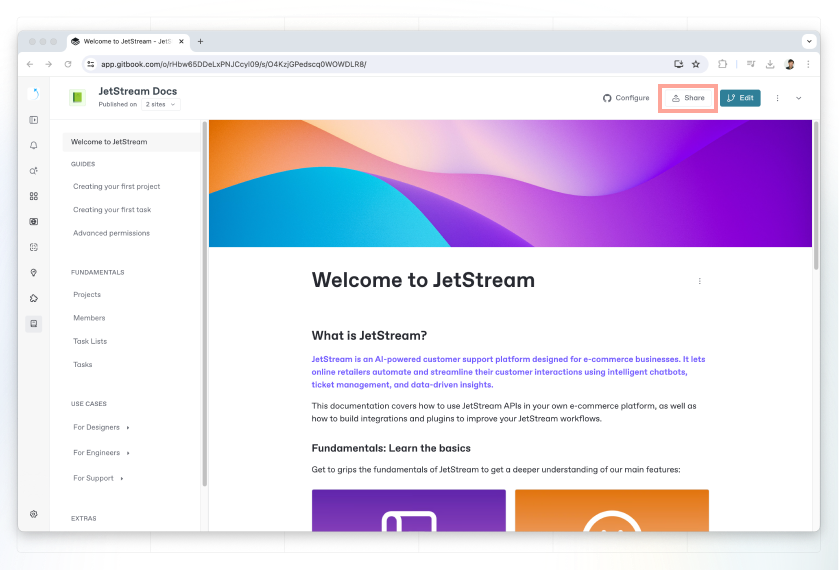
To share a space, click the **share** button in the top-right corner of a space. This will open the share modal.
Share a space
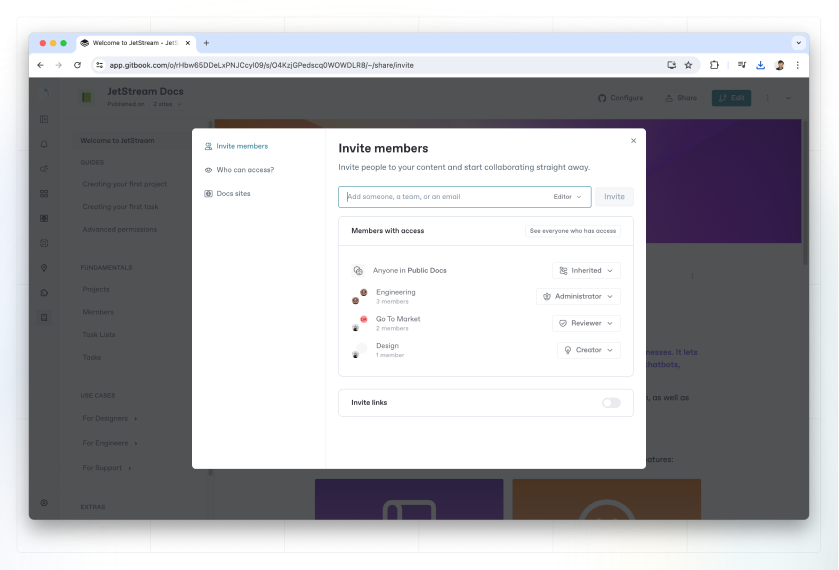
Inside the share modal, you’ll see different sharing options on the left-hand side.
{% hint style="info" %}
The options available to you will depend on your permissions in the space, as well as [your organization’s plan](https://gitbook.com/docs/~/changes/pfQHJq75QY5xMYvctdXP/account-management/plans).
{% endhint %}
### Invite members
Invite members
By default, every member of your organization can see all the content in your organization. But their permissions are inherited from the [role](https://gitbook.com/docs/~/changes/pfQHJq75QY5xMYvctdXP/account-management/member-management/roles) assigned to them within the [**Organization settings**](https://gitbook.com/docs/~/changes/pfQHJq75QY5xMYvctdXP/account-management/organization-management) area.
You can leave the **Invite as an organization member** toggle switched on to make them a full member of your organization, with access to all your team’s content when they’re logged in.
Alternatively, toggle this off to invite them as a [guest](https://gitbook.com/docs/~/changes/pfQHJq75QY5xMYvctdXP/account-management/member-management/roles#guest-role). Guests only have access to the individual spaces that you invite them to, and can be given a specific role within that space — whether it’s to edit the content, or only view and comment on it.
{% hint style="warning" %}
Inviting someone either as a full member or a guest will make them a member of the organization that owns the space, which **will increase your overall subscription charge.**
The cost for this will depend on [your organization’s plan](https://gitbook.com/docs/~/changes/pfQHJq75QY5xMYvctdXP/account-management/plans).
{% endhint %}
It is also possible to [invite members to the organization ](https://gitbook.com/docs/~/changes/pfQHJq75QY5xMYvctdXP/account-management/member-management/invite-members-to-your-organization)from within the **Organization settings** area.
### Who can access?
This tab confirms the current visibility of the space, along with who has access to it within the GitBook app. You cannot change any settings here — it’s simply a summary.
### Publishing your content
{% hint style="info" %}
Looking to publish your content to the web? Head to the [published documentation](https://gitbook.com/docs/~/changes/pfQHJq75QY5xMYvctdXP/published-documentation) section to learn more.
{% endhint %}