> For the complete documentation index, see [llms.txt](https://gitbook.com/docs/llms.txt). Markdown versions of documentation pages are available by appending `.md` to page URLs; this page is available as [Markdown](https://gitbook.com/docs/documentation/zh/guan-li-ni-de-zhan-dian/customization/extra-configuration.md).
# 额外配置
为已发布的文档配置额外选项
在 **配置** 在该选项卡中,您可以更改与您的站点相关的其他设置。例如,您可以设置界面本地化、链接行为和页面操作,帮助用户将您的内容添加到 ChatGPT 等 AI 工具中。
在本页中,您将了解这些选项各自的作用,以及如何启用或禁用它们。
### 本地化用户界面
您可以从语言列表中选择一种语言,以本地化已发布内容的用户界面。这会将翻译应用于界面中不可自定义的区域。
此设置将 *不* 不会自动翻译您的实际内容,但它可以帮助界面与您正在编写的语言保持一致。要了解更多关于翻译内容的信息,请前往 [翻译](/docs/documentation/zh/gitbook-dai-li/translations.md) 部分。
我们尚未提供您想看到的某种语言吗? [告诉我们](https://github.com/GitbookIO/gitbook/issues),或 [贡献您自己的翻译](https://www.gitbook.com/solutions/open-source)!
### 主链接
在 **主链接** 部分的 **配置** 选项卡中,您可以为文档站点左上角的徽标设置自定义 URL。
默认情况下,点击徽标或站点标题会将用户带回文档站点的第一页。您可以设置站点外部的自定义 URL——或者站点内的某个页面、章节或变体——来替代打开。如果您的文档是更大网站的一部分,这有助于访客导航回您的着陆页。
### 外部链接
该 **外部链接** 部分 **配置** 选项卡控制您的站点用户点击外部 URL 链接时的行为。默认情况下,这些链接会在同一选项卡中打开,但如果您愿意,可以将其改为在新选项卡中打开。
### 页面操作
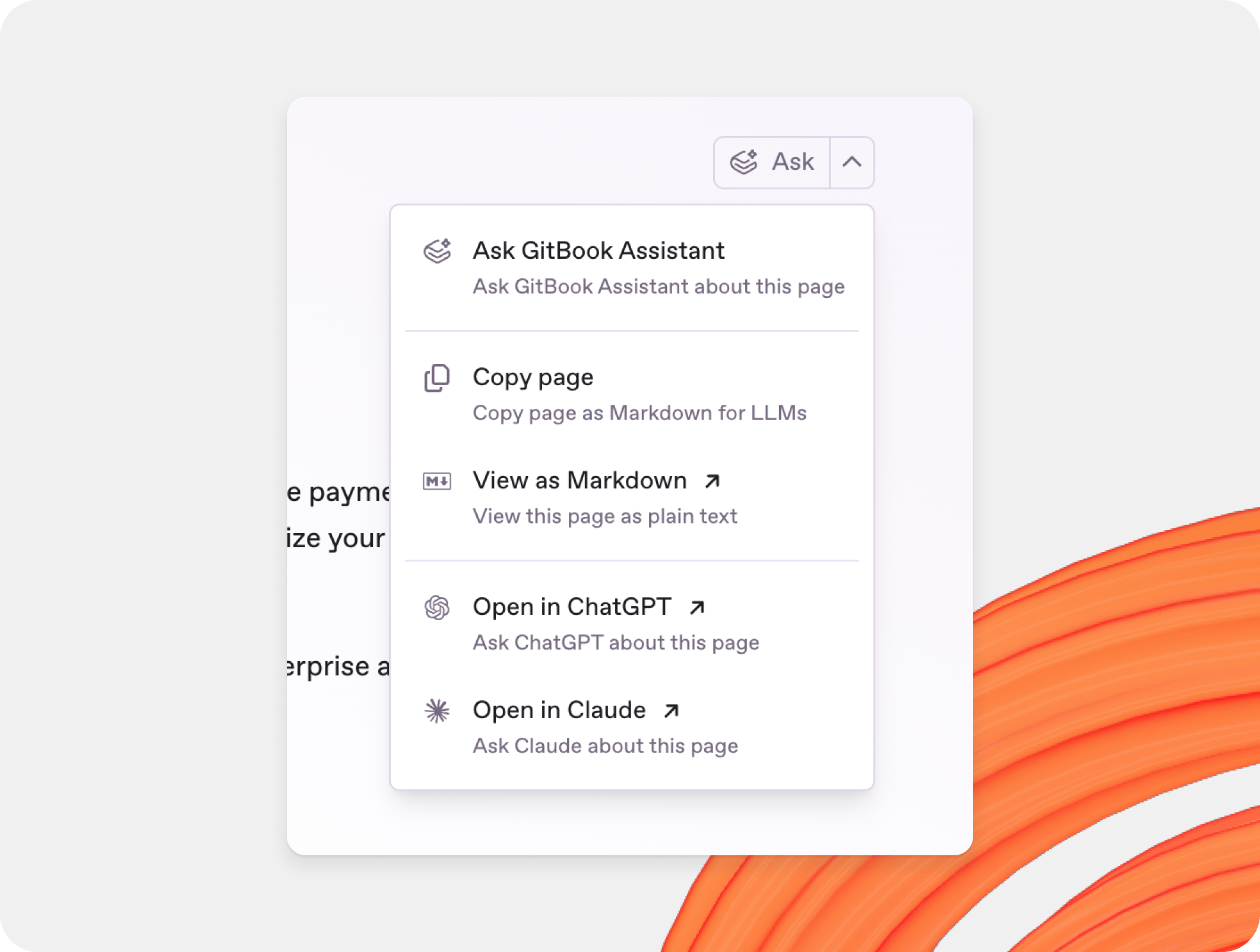
页面操作会在文档的每个页面中添加一个页面级下拉菜单,使用户能够对页面内容执行快速操作——非常适合将您的文档内容作为 AI 提示词中的上下文。
如果您不希望在已发布的文档中显示页面选项,您可以在 **配置** 选项卡中禁用此选项。
如果您禁用 **页面操作**,GitBook 也会禁用位于 `~gitbook/mcp`。要使用 MCP,请保持 **页面操作** 在……中启用 **站点自定义** → **页面操作**.
#### 在 AI 提供方中打开
启用此选项可显示一个操作,用页面内容在 ChatGPT 或 Claude 中打开。
#### 复制/以 Markdown 查看
启用此选项可显示一个将页面复制或以 Markdown 形式查看的操作。
#### 连接 MCP 服务器
启用此选项可在页面操作菜单中显示 MCP 服务器链接。
此选项并不会启用 MCP 服务器本身。MCP 服务器仅在 **页面操作** 启用时才可工作。要了解更多,请参阅 [已发布文档的 MCP 服务器](/docs/documentation/zh/mian-xiang-du-zhe-de-ai/mcp-servers-for-published-docs.md).
#### 在 GitHub/GitLab 上编辑
如果您的章节已连接到 Git 仓库,您可以在 **配置** 选项卡中启用此选项,以显示一个链接,让用户可从您关联的仓库为文档做出贡献。
#### 导出 PDF
启用此选项可允许访客 [导出 PDF](/docs/documentation/zh/fa-bu/pdf-export.md) 您的文档。
### 隐私政策
在 **隐私政策** 部分的 **配置** 选项卡中,您可以链接到您自己的隐私政策,以帮助访客了解您的 GitBook 内容如何使用 Cookie 以及您如何保护他们的隐私。如果您选择不设置,您的站点将默认使用 [GitBook 的隐私政策](https://gitbook.com/docs/policies/privacy-and-security/statement/cookies).
---
# Agent Instructions
This documentation is published with GitBook. GitBook is the documentation platform designed so that both humans and AI agents can read, navigate, and reason over technical content effectively. Learn more at gitbook.com.
## Querying This Documentation
If you need additional information that is not directly available in this page, you can query the documentation dynamically by asking a question.
Perform an HTTP GET request on the current page URL with the `ask` query parameter, and the optional `goal` query parameter:
```
GET https://gitbook.com/docs/documentation/zh/guan-li-ni-de-zhan-dian/customization/extra-configuration.md?ask=&goal=
```
`ask` is the immediate question: it should be specific, self-contained, and written in natural language.
`goal` is optional and describes the broader end goal you are ultimately trying to accomplish on behalf of the user. GitBook uses it to tailor the answer towards what is most useful for that goal.
The response will contain a direct answer to the question and relevant excerpts and sources from the documentation.
Use this mechanism when the answer is not explicitly present in the current page, you need clarification or additional context, or you want to retrieve related documentation sections.