> For the complete documentation index, see [llms.txt](https://gitbook.com/docs/llms.txt). Markdown versions of documentation pages are available by appending `.md` to page URLs; this page is available as [Markdown](https://gitbook.com/docs/documentation/zh/fa-bu/site-redirects.md).

# 站点重定向

<figure><img src="/files/4fcef0be70b09a308abd746b90125f21298309f8" alt="A GitBook screenshot showing site redirects"><figcaption><p>在迁移文档或重组内容时，站点重定向很有用，可以避免失效链接，因为失效链接会影响 SEO。</p></figcaption></figure>

当你将文档从一个提供商迁移到另一个提供商时，通常会使用重定向——比如刚把文档迁移到 GitBook 时。失效链接会影响 SEO，因此我们建议在需要时设置重定向。

除了 [GitBook 创建的自动重定向](#about-automatic-redirects)，你可以在站点域名下的任何路径创建重定向。

重定向可以创建为 **实时** 或者 **草稿**。草稿重定向允许你在发布之前准备并审查重定向规则。草稿不会影响你的网站线上版本，直到它们被启用。

## 管理你站点中的重定向

要开始，请打开你站点的 **设置**，在 **常规** 在站点侧边栏中，然后点击 **重定向**.

### 创建重定向

点击 **添加重定向** 并选择 **手动** 选项。

填写 **源路径** ——你想重定向的 URL slug——以及 **目标** 内容，你希望将访客发送到的内容。你可以选择站点上的任何版块、变体或页面。

点击 **启用重定向** 以立即启用该重定向。

如果你想先创建重定向但暂不让它上线，请点击 **另存为草稿** 。草稿重定向会显示在 **草稿** 草稿选项卡中，并可稍后启用。

你还可以创建 **通配符重定向** ，方法是在源路径末尾添加 \*，例如：

* /docs/\* 匹配 /docs/ 下的所有内容
* /changelog\* 匹配以 /changelog 开头的路径

当你的源路径包含通配符 (\*) 时，你可以启用 **将通配符替换为匹配的文本**.

* **开启：** 被 \* 匹配到的部分会追加到目标路径。
  * 示例：源 /docs/\* → 目标 /help\n/docs/install 重定向到 /help/install
* **关闭：** 所有匹配的 URL 都会重定向到同一个固定目标。
  * 示例：源 /docs/\* → 目标 /help\n/docs/install 重定向到 /help

如果你想为同一页面添加另一个重定向，请切换 **添加另一个重定向** 后再点击 **启用重定向** 或者 **另存为草稿**.

添加重定向后，模态窗口会保持打开状态，目标内容会保留为你之前的选择，这样你就可以快速添加另一个源路径。

{% hint style="warning" %}
**注意：** GitBook 会以不区分大小写的方式解析已发布 URL，因此仅在大小写上不同的两个重定向会被视为同一路径。如果你是从使用区分大小写 URL 的平台迁移，导入前可能需要先合并重定向。
{% endhint %}

### 编辑重定向

要编辑重定向，请点击列表中其旁边的 **编辑** 图标。更新重定向并点击 **启用重定向** 以发布你的更改。

如果该重定向当前是 **draft**，你也可以直接在编辑模态窗口中点击 **启用重定向**.

### 启用草稿重定向

草稿重定向会显示在重定向表的 **草稿** 草稿选项卡中。

你可以通过两种方式发布草稿重定向：

• 打开重定向并点击 **启用重定向** 在编辑模态窗口中。\
• 使用 **表格中的切换开关** 直接启用重定向。

启用后，重定向会移动到 **实时** 线上选项卡中，并立即开始为访客路由。

### 从 CSV 导入重定向

点击 **添加重定向** 并选择 **上传 CSV**.

上传一个包含以下列的 CSV： `source`, `目标`，以及可选的 `意图`.

* `source` 是你想重定向的路径，例如 /docs/site-redirects
* `目标` 可以是：
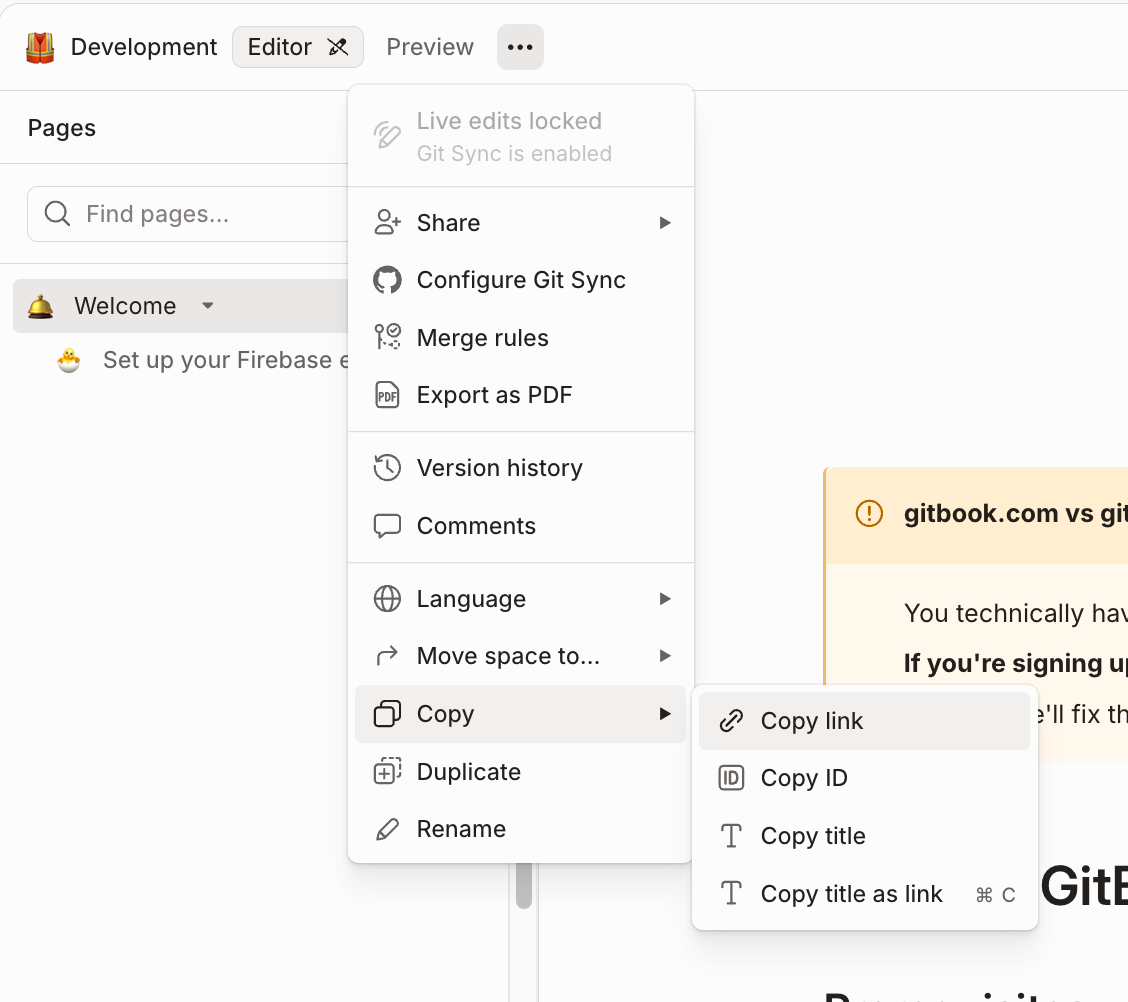
  * 某个具体页面，使用下方截图所示的页面管理 URL
  * 一个外部 URL
  * 为空，具体取决于意图
* `意图` 可以是：
  * live、留空或完全省略，用于创建、更新或删除线上重定向
  * draft，用于创建、更新或删除草稿重定向
  * publish，用于将现有草稿重定向发布为线上， `目标` 必须为空。

<div data-with-frame="true"><figure><img src="/files/663a469c9eb51165872c21b7aacfdf4c0bc8e609" alt=""><figcaption><p>你可以在此菜单中找到某个页面的 GitBook 管理 URL</p></figcaption></figure></div>

每次导入最多支持 500 行。

如果你的 CSV 包含重复的源值，则只处理第一行。导入会以 upsert 方式运行：具有相同源的现有重定向会被更新，而尚不存在的源会创建新的重定向。

如果有任何行失败，右下角的 toast 中会提供错误 CSV。它包含源、目标以及每个错误的简短说明，方便你修复、删除错误列后重新导入。

#### CSV 示例

<table data-search="false"><thead><tr><th>source</th><th>目标</th><th>意图</th><th>结果</th></tr></thead><tbody><tr><td>/docs/site-redirects</td><td>https://example.com/page</td><td>空白</td><td>创建或更新线上重定向</td></tr><tr><td>/docs/site-redirects</td><td>https://example.com/page</td><td>线上</td><td>创建或更新线上重定向</td></tr><tr><td>/docs/site-redirects</td><td>https://example.com/page</td><td>draft</td><td>创建或更新草稿重定向</td></tr><tr><td>/docs/site-redirects</td><td>空</td><td>空白</td><td>删除线上重定向</td></tr><tr><td>/docs/site-redirects</td><td>空</td><td>线上</td><td>删除线上重定向</td></tr><tr><td>/docs/site-redirects</td><td>空</td><td>draft</td><td>删除草稿重定向</td></tr><tr><td>/docs/site-redirects</td><td>空</td><td>发布</td><td>将现有草稿重定向发布为线上</td></tr></tbody></table>

## 关于自动重定向

每当页面被移动或重命名时，其规范 URL 也会随之改变。为了保持内容可访问，GitBook 会自动创建一个 [HTTP 307](https://developer.mozilla.org/en-US/docs/Web/HTTP/Reference/Status/307) 从旧 URL 到新 URL 的重定向。

每次加载 URL 时，GitBook 都会按以下步骤解析它：

1. 通过跟随任何自动创建的重定向，将站点内容解析到其规范 URL。
2. 如果无法解析该 URL，则会检查该 URL 是否匹配 [章节级重定向](/docs/documentation/zh/wen-dang-ji-dai-ma/git-sync/content-configuration.md#redirects)，它们定义在你的仓库的 `.gitbook.yaml` 文件。
3. 最后，会检查该 URL 是否匹配站点级重定向，这些重定向通过 [上述流程创建](#creating-redirects).


---

# Agent Instructions
This documentation is published with GitBook. GitBook is the documentation platform designed so that both humans and AI agents can read, navigate, and reason over technical content effectively. Learn more at gitbook.com.

## Querying This Documentation
If you need additional information that is not directly available in this page, you can query the documentation dynamically by asking a question.

Perform an HTTP GET request on the current page URL with the `ask` query parameter, and the optional `goal` query parameter:

```
GET https://gitbook.com/docs/documentation/zh/fa-bu/site-redirects.md?ask=<question>&goal=<endgoal>
```

`ask` is the immediate question: it should be specific, self-contained, and written in natural language.
`goal` is optional and describes the broader end goal you are ultimately trying to accomplish on behalf of the user. GitBook uses it to tailor the answer towards what is most useful for that goal.

The response will contain a direct answer to the question and relevant excerpts and sources from the documentation.

Use this mechanism when the answer is not explicitly present in the current page, you need clarification or additional context, or you want to retrieve related documentation sections.