> For the complete documentation index, see [llms.txt](https://gitbook.com/docs/llms.txt). Markdown versions of documentation pages are available by appending `.md` to page URLs; this page is available as [Markdown](https://gitbook.com/docs/documentation/zh/collaborate/change-requests/change-requests-screen.md).
# 变更请求界面
了解专门的变更请求界面,它帮助你在合并并发布到文档之前浏览、管理和审查变更请求
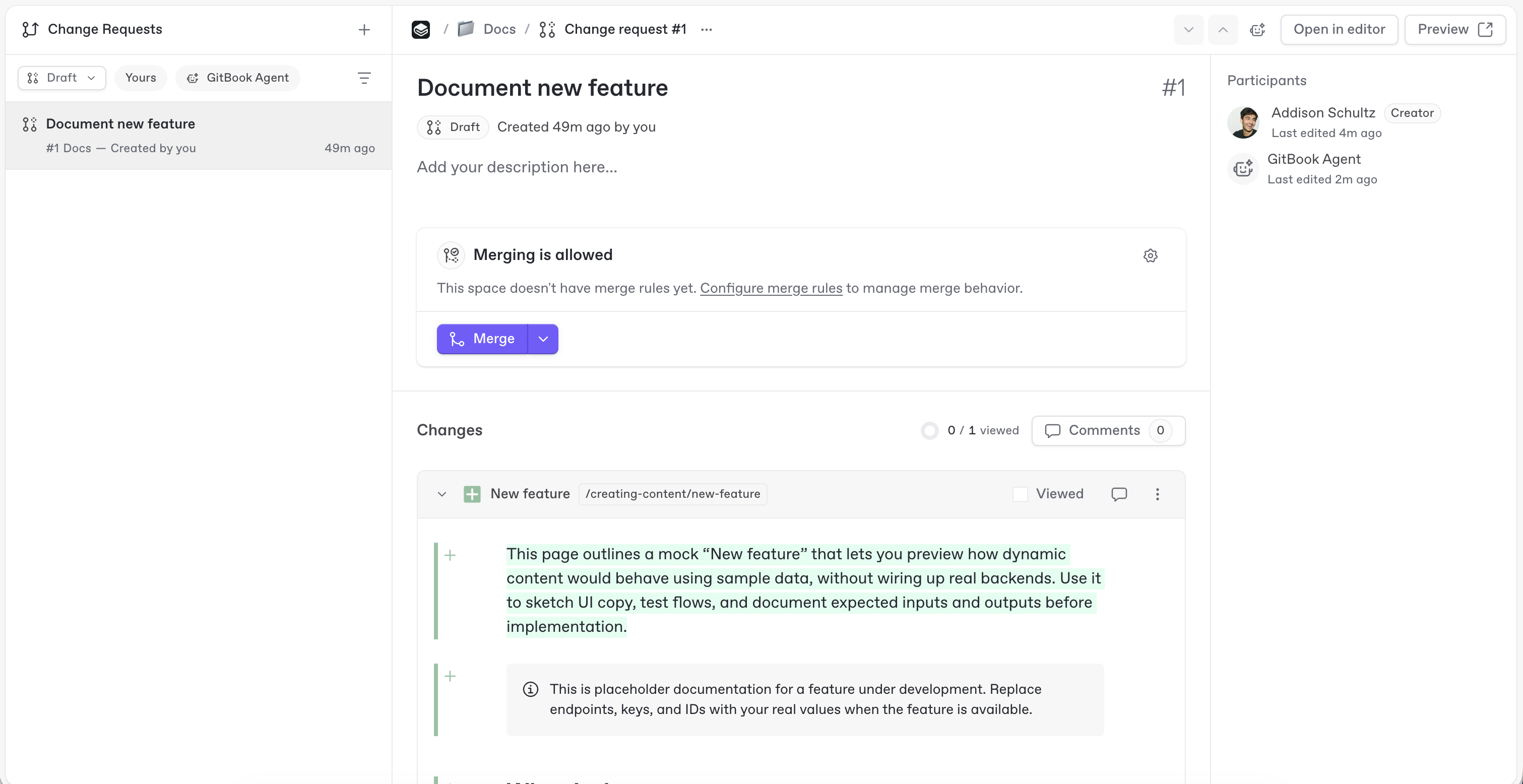
更改请求页面可让你在整个站点中查看和管理活动的更改请求——打开它们、合并它们,或与 GitBook Agent 协作进行更新,所有操作都集中在一个地方。可从以下位置打开: **变更请求** 在站点侧边栏中。
在更改请求页面查看活动的更改请求。
### 浏览更改请求页面
你站点中的所有更改请求都会显示在更改请求页面中。你可以按状态筛选,或仅显示由 GitBook Agent 创建的更改请求。
点击某个更改请求即可在展开视图中打开它。在那里,你可以查看、编辑并合并该更改请求,或继续与 GitBook Agent 一起处理。展开视图还会显示参与者和审阅者、描述以及更改的差异视图。
要在编辑器中检查差异,请点击 **编辑** 右上角,以打开该更改请求的空间,然后切换到 **更改** 选项卡。差异导航控件会显示在那里。
要在编辑器中检查差异,请点击 **编辑** 右上角,以打开该更改请求的空间,然后切换到 **更改** 选项卡。在编辑器底部,浮动的差异导航器可让你浏览已更改的块,继续查看带有差异的下一页,并使用可用的审阅操作从最后一处更改完成审阅。
### 审阅更改请求
当有人请求你审阅时,你可以直接在更改请求页面编辑内容并留下反馈。
你可以请求更多更改,或批准该更改请求,表示它已准备好合并。
大多数审阅都在更改请求的评论中进行,在那里协作者可以讨论特定内容块或整个更改请求。你也可以请 [GitBook 代理](/docs/documentation/zh/gitbook-agent/review-change-requests-with-gitbook-agent.md) 它来审阅更改请求——它可以检查、规划,并与你的团队一起继续处理更改。
---
# Agent Instructions
This documentation is published with GitBook. GitBook is the documentation platform designed so that both humans and AI agents can read, navigate, and reason over technical content effectively. Learn more at gitbook.com.
## Querying This Documentation
If you need additional information that is not directly available in this page, you can query the documentation dynamically by asking a question.
Perform an HTTP GET request on the current page URL with the `ask` query parameter, and the optional `goal` query parameter:
```
GET https://gitbook.com/docs/documentation/zh/collaborate/change-requests/change-requests-screen.md?ask=&goal=
```
`ask` is the immediate question: it should be specific, self-contained, and written in natural language.
`goal` is optional and describes the broader end goal you are ultimately trying to accomplish on behalf of the user. GitBook uses it to tailor the answer towards what is most useful for that goal.
The response will contain a direct answer to the question and relevant excerpts and sources from the documentation.
Use this mechanism when the answer is not explicitly present in the current page, you need clarification or additional context, or you want to retrieve related documentation sections.