> For the complete documentation index, see [llms.txt](https://gitbook.com/docs/llms.txt). Markdown versions of documentation pages are available by appending `.md` to page URLs; this page is available as [Markdown](https://gitbook.com/docs/documentation/zh/analytics/insights/ai-insights.md).
# AI 助手
了解访客向 GitBook Assistant 提出了什么问题、你的内容回答得有多好,以及你的文档在哪些方面仍有不足
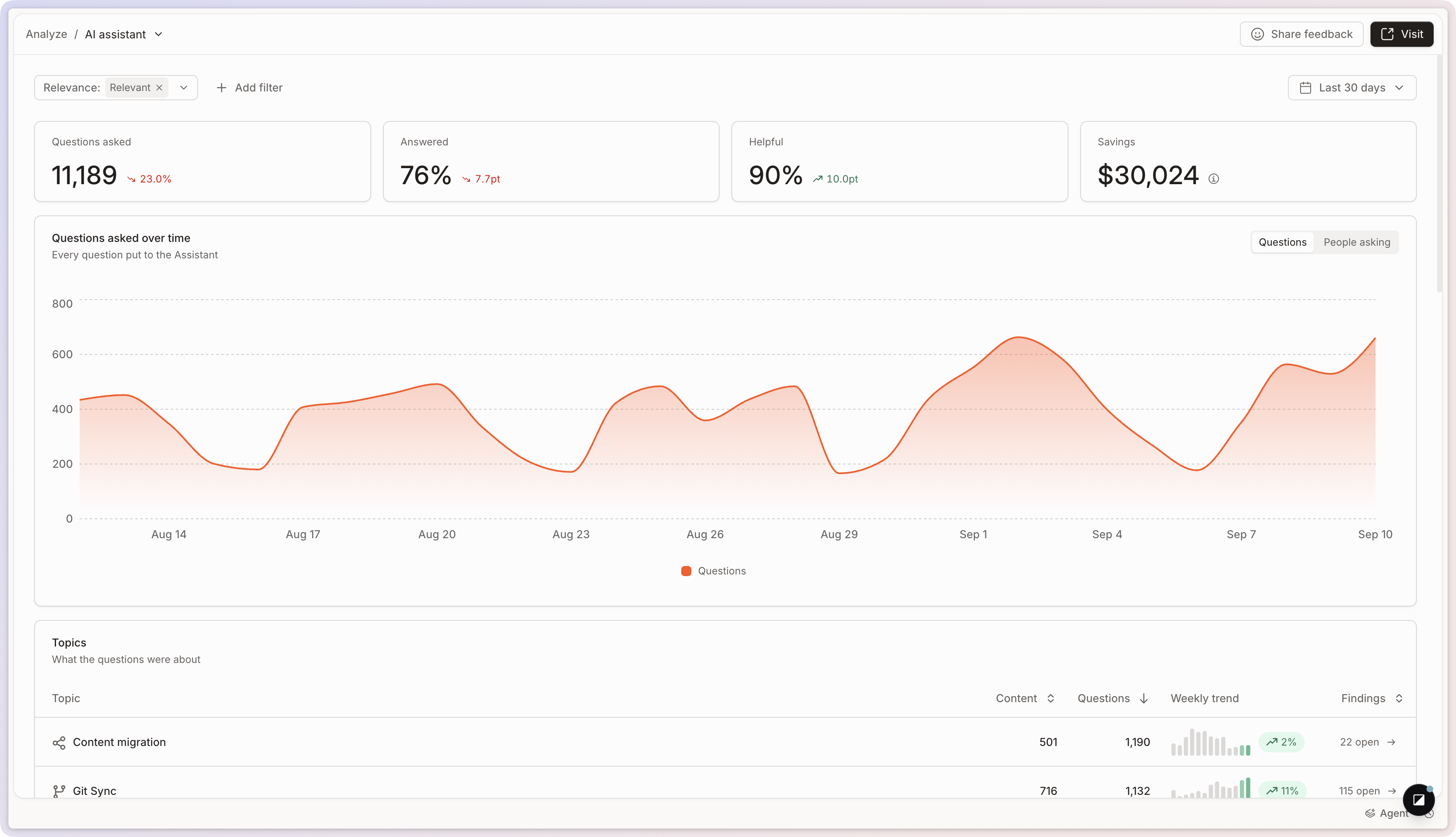
该 **AI 助手** 报告显示访客提出了什么问题,以及回答得有多有效 [GitBook 助手](/docs/documentation/zh/ai-for-your-readers/gitbook-ai-assistant.md) 并使用你的内容来回答它们。
要打开它,请前往 **分析 → AI 助手** 你网站侧边栏中的。
四项指标概括了你所选的时间段:
* **提出的问题**:访客向助手提出的问题。
* **已回答**:助手解决的问题占比。
* **有帮助**:访客对所获答案的评价。
* **节省**:通过回答这些问题而避免的估算支持工作量。
参见 [站点分析](/docs/documentation/zh/analytics/insights.md) 关于筛选器、时间段和比较时间段。
AI 助手报告。
## 主题
GitBook 会将问题分组为 **主题**,因此你可以从主题层面而不是逐个问题地了解访客想要什么。每个主题都会显示其随时间的表现,以及它占你流量的比例。
点击某个主题即可打开其详细视图,并查看其中的每个问题,按 **类型** 或 **最近程度**分组。可用它来回顾重复出现的需求,发现文档空缺,并了解你的网站是否成功回答了该领域的问题。
## 细分
三张卡片会按以下维度拆分该时间段: **已回答** (响应是否解决了问题), **类别** (所提问题的类型),以及 **渠道** (助手的使用位置:你的网站、 [文档嵌入](/docs/documentation/zh/publish/embedding.md),或一个已连接的工具)。点击任意值即可按其筛选整份报告。
## 问题
该 **问题** 该卡片列出向助手提出的每个问题。点击任一问题可查看 GitBook 如何处理它,以及哪些内容支持了该回答。
在详细视图顶部,你可以查看问题本身、访客提问的频率、其类型,以及它所属的主题。
### 对话与回答质量
在摘要下方,你可以查看与该问题相关的对话,并了解 GitBook 是完全、部分还是完全没有回答。对话面板还会显示完整的助手交流内容,包括任何后续问题和回复。
### 来源与上下文
来源部分显示哪些页面、记录或 [已连接内容](/docs/documentation/zh/ai-for-your-readers/connections.md) GitBook 用于回答该问题。可用它来验证 AI 是否引用了正确的内容——并找出相关页面存在但未被呈现出来的地方。
### 导出问题和答案
在“问题”卡片中,点击 **导出为 CSV** 并选择要下载的内容:
* **问题摘要**:每个问题一行,包含其总计。
* **答案详情**:每个答案一行,包含其主题、解决情况、实用性、相关性、点赞/点踩反馈、渠道和语言。用它来查看助手的回复内容,以及答案是否有效。
## 常见问题
我该如何使用 AI 助手报告?
它为你的团队提供访客在寻找答案时如何与文档互动的概览。
筛选报告有助于你识别内容缺口。你可以按以下项进行筛选:
* 访客最常提出的问题
* 访客搜索但没有答案的问题
* 你的文档未涵盖的主题
解决这些缺口可帮助访客更快找到答案——并更快理解你的产品。
{% hint style="info" %}
[内容缺口](/docs/documentation/zh/analytics/content-gaps.md) 会将这些缺口汇总为一个排名列表,而 GitBook Agent 可以打开变更请求来填补其中一个。
{% endhint %}
“节省”是如何计算的?
这是一个估算,基于这样一种假设:每五个已回答的问题中就有一个原本会变成支持工单。组织管理员可以通过 API 设置支持工单或支持工时的成本,使该估算更贴合你的团队。请将其视为数量级,而不是精确数值。
---
# Agent Instructions
This documentation is published with GitBook. GitBook is the documentation platform designed so that both humans and AI agents can read, navigate, and reason over technical content effectively. Learn more at gitbook.com.
## Querying This Documentation
If you need additional information that is not directly available in this page, you can query the documentation dynamically by asking a question.
Perform an HTTP GET request on the current page URL with the `ask` query parameter, and the optional `goal` query parameter:
```
GET https://gitbook.com/docs/documentation/zh/analytics/insights/ai-insights.md?ask=&goal=
```
`ask` is the immediate question: it should be specific, self-contained, and written in natural language.
`goal` is optional and describes the broader end goal you are ultimately trying to accomplish on behalf of the user. GitBook uses it to tailor the answer towards what is most useful for that goal.
The response will contain a direct answer to the question and relevant excerpts and sources from the documentation.
Use this mechanism when the answer is not explicitly present in the current page, you need clarification or additional context, or you want to retrieve related documentation sections.