> For the complete documentation index, see [llms.txt](https://gitbook.com/docs/llms.txt). Markdown versions of documentation pages are available by appending `.md` to page URLs; this page is available as [Markdown](https://gitbook.com/docs/documentation/zh/analytics/insights/agents-and-mcp.md).
# Agents 与 MCP
跟踪大语言模型、编码代理和爬虫如何阅读你的文档
该 **Agents 与 MCP** 报告涵盖所有访问你网站的非人类读取者:LLM、编码代理、爬虫,以及任何连接到你网站的 [MCP 服务器](/docs/documentation/zh/ai-for-your-readers/mcp-servers-for-published-docs.md).
要打开它,请前往 **分析 → 代理与 MCP** 你网站侧边栏中的。
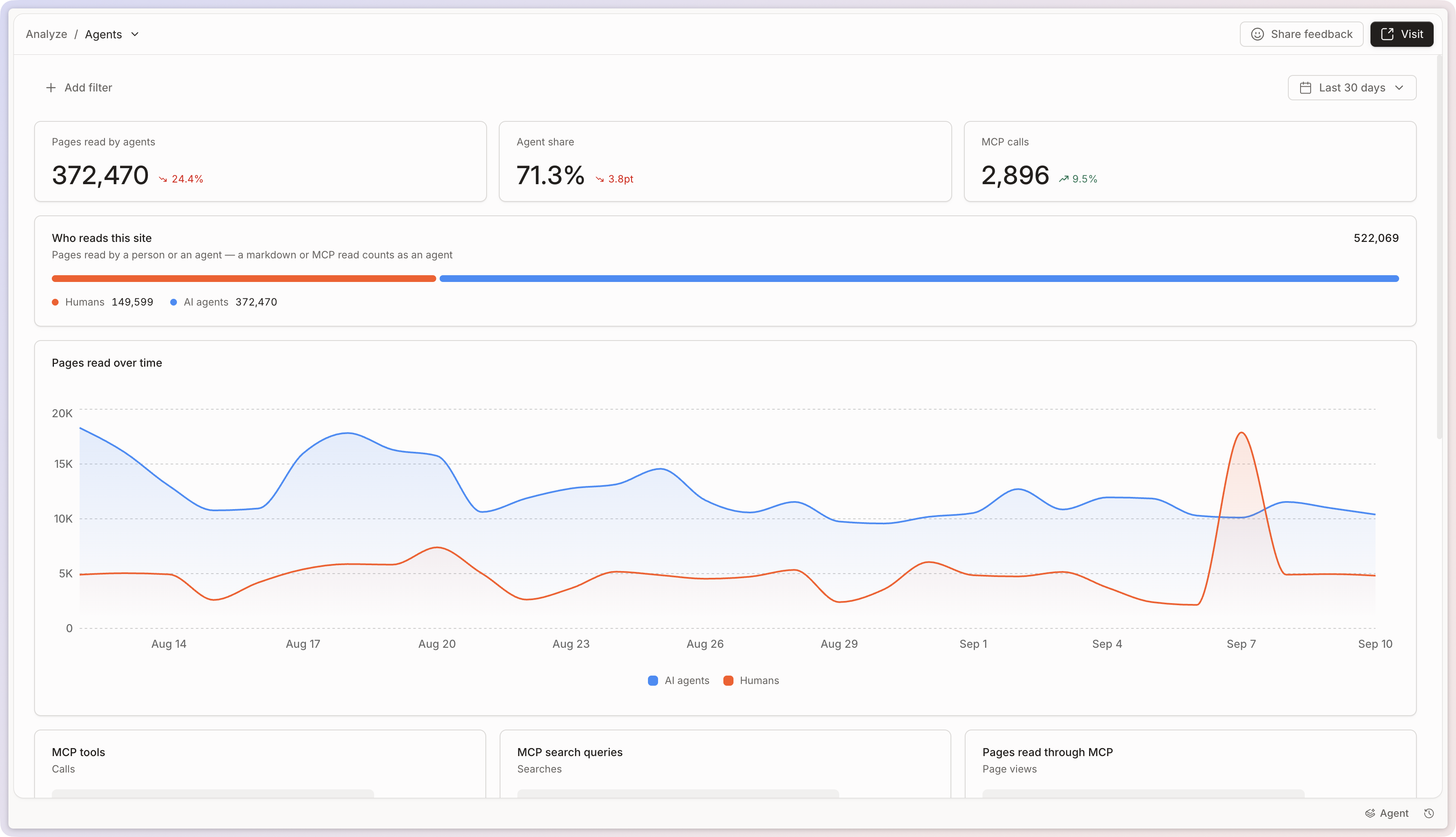
在顶部,你会看到代理读取的页面、它们在你网站所有读取中的占比,以及 MCP 调用次数。 **谁在读取此网站** 图表将读取分成人类和代理两部分,因此你可以观察这种平衡如何随时间变化。参见 [站点分析](/docs/documentation/zh/analytics/insights.md) 关于筛选器、时间段和比较时间段。
《代理与 MCP》报告。
## 入口
代理通过多个入口访问你的内容,报告会统计每一种:
* **Markdown**:作为 `.md`.
* **llms.txt**:你的 [LLM 可直接读取](/docs/documentation/zh/getting-started/llm-ready-docs.md) 索引文件。
* **MCP**:通过你网站的 MCP 服务器读取。
* **网站页面浏览量** 和 **RSS**:代理像浏览器一样读取你的网站。
## MCP 活动
三张卡片概览了工具如何处理你的文档: **MCP 工具** 它们调用的, **MCP 搜索查询** 它们运行的,以及 **它们通过 MCP 读取的页面**。它们共同展示了你的产品 AI 集成依赖文档的哪些部分。
## 哪些代理,以及它们读取了什么
**Agents** 对读取你网站的客户端进行排名。选择一个入口查看是谁通过它读取。未表明身份的客户端会归类为 **未识别**.
**已读取页面** 按代理读取内容的多少对你的内容进行排名,并按它们通过的入口进行划分。
{% hint style="info" %}
如果代理很少访问你的内容,请参见 [为 LLM 准备好的文档](/docs/documentation/zh/getting-started/llm-ready-docs.md) 了解如何让 AI 工具更容易发现并读取你的网站。
{% endhint %}
---
# Agent Instructions
This documentation is published with GitBook. GitBook is the documentation platform designed so that both humans and AI agents can read, navigate, and reason over technical content effectively. Learn more at gitbook.com.
## Querying This Documentation
If you need additional information that is not directly available in this page, you can query the documentation by asking a question.
Perform an HTTP GET request on the following URL with the `ask` and `goal` query parameters:
```
GET https://gitbook.com/docs/documentation/zh/analytics/insights/agents-and-mcp.md?ask=&goal=
```
`ask` is the immediate question: it should be specific, self-contained, and written in natural language.
`goal` is what the user is ultimately trying to achieve, the reason they need the answer. Sharing it helps GitBook give you a better, more relevant answer. A goal is most helpful when it describes the outcome the user wants rather than restating the question. For example, with `ask=how do I create an API token`, a goal like `automate deployments from our CI pipeline` lets GitBook tailor the answer to that use case.
The response will contain a direct answer to the question and relevant excerpts and sources from the documentation.
Use this mechanism when the answer is not explicitly present in the current page, you need clarification or additional context, or you want to retrieve related documentation sections.