> For the complete documentation index, see [llms.txt](https://gitbook.com/docs/llms.txt). Markdown versions of documentation pages are available by appending `.md` to page URLs; this page is available as [Markdown](https://gitbook.com/docs/documentation/ja-gitbook-documentation/analytics/insights/ai-insights.md).
# AI アシスタント
訪問者がGitBook Assistantに何を尋ねているか、コンテンツがそれにどれだけ応えているか、そしてドキュメントのどこが不十分かを確認できます
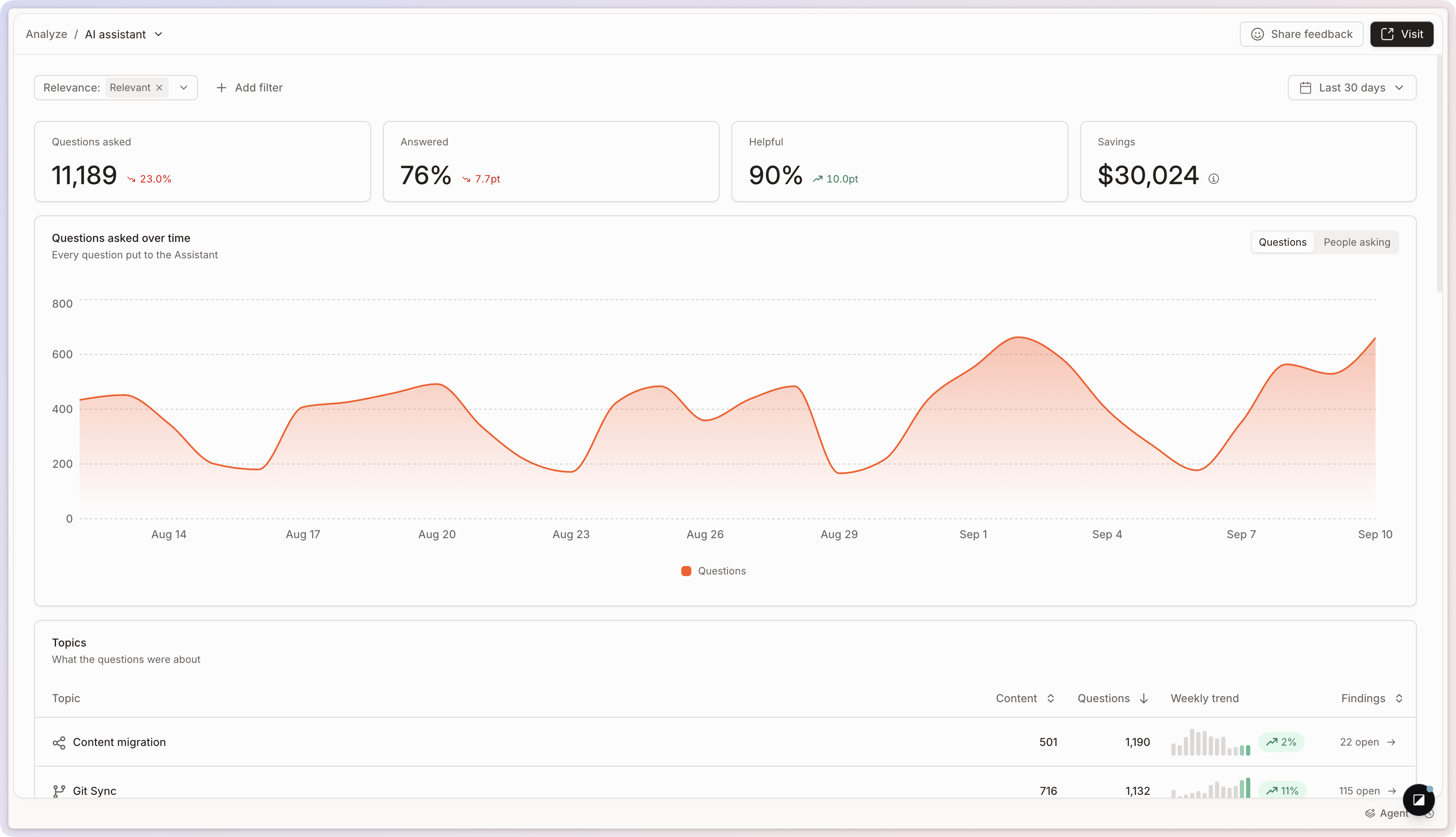
この **AI アシスタント** レポートでは、訪問者が何を質問し、どれだけ効果的に [GitBook Assistant](/docs/documentation/ja-gitbook-documentation/ai-for-your-readers/gitbook-ai-assistant.md) あなたのコンテンツを使ってそれに回答しているかを示します。
開くには、 **分析 → AIアシスタント** をサイトのサイドバーで開きます。
選択した期間は、4つの指標で要約されます:
* **質問された件数**:訪問者がアシスタントに投げかけた質問です。
* **回答済み**:アシスタントが解決した質問の割合です。
* **役立ち度**:訪問者が受け取った回答をどう評価したかです。
* **節約**:それらの質問に回答することで回避できたと見積もられるサポート工数です。
を参照してください [サイト分析](/docs/documentation/ja-gitbook-documentation/analytics/insights.md) フィルター、期間、および期間比較について。
AIアシスタントのレポートです。
## トピック
GitBookでは質問を **トピック**にグループ化するので、一度に1件の質問ではなく、主題のレベルで訪問者が求めている内容を読めます。各トピックには、時間の経過に伴うパフォーマンスと、トラフィック全体に占める割合が表示されます。
トピックをクリックすると詳細ビューが開き、その中のすべての質問を **種類** または **新しさ**でグループ化して確認できます。これを使って、繰り返し発生するニーズを見直し、ドキュメントの不足を見つけ、その分野でサイトが質問にうまく答えられているかを把握してください。
## 内訳
3つのカードで、期間を次の観点に分けて表示します: **回答済み** (回答が質問を解決したかどうか)、 **カテゴリ** (質問の種類)、および **チャンネル** (アシスタントが使用された場所:あなたのサイト、 [Docs Embed](/docs/documentation/ja-gitbook-documentation/publish/embedding.md)または接続済みツール)。値をクリックすると、レポート全体をその条件で絞り込めます。
## 質問
この **質問** このカードには、アシスタントに投げかけられたすべての質問が一覧表示されます。1件をクリックすると、GitBookがそれをどのように処理したか、またどのコンテンツがその回答を支えたかを確認できます。
詳細ビューの上部では、質問そのもの、訪問者がその質問をした頻度、種類、属するトピックを確認できます。
### 会話と回答品質
要約の下では、その質問に関連する会話を確認し、GitBook がそれに完全に、部分的に、またはまったく回答できたかを確認できます。会話パネルには、フォローアップの質問や応答を含む、Assistant のやり取り全体も表示されます。
### ソースとコンテキスト
ソースセクションには、どのページ、レコード、または [接続されたコンテンツ](/docs/documentation/ja-gitbook-documentation/ai-for-your-readers/connections.md) 質問への回答にGitBookが使用した内容です。AIが適切なコンテンツを参照していたかを確認し、関連ページは存在するのに表示されなかった箇所を見つけるのに役立ちます。
### 質問と回答を書き出す
質問カードで **CSVとしてエクスポート** をクリックし、ダウンロードする内容を選択します:
* **質問の概要**:質問ごとに1行で、合計が表示されます。
* **回答の詳細**:回答ごとに1行で、トピック、解決状況、役立ち度、関連性、親指によるフィードバック、チャネル、言語が表示されます。アシスタントの返答内容と、回答が期待どおりだったかを確認するのに役立ちます。
## FAQ
AIアシスタントのレポートはどう使えばよいですか?
訪問者が答えを探す際にドキュメントとどのようにやり取りしているかを、チーム全体で把握できます。
レポートを絞り込むことで、コンテンツの不足を特定できます。次の条件でフィルターできます:
* 訪問者が最もよく尋ねる質問
* 訪問者が検索しているのに回答がない質問
* ドキュメントで扱っていないトピック
こうした不足を解消することで、訪問者はより早く答えを見つけられ、製品をより早く理解できます。
{% hint style="info" %}
[コンテンツのギャップ](/docs/documentation/ja-gitbook-documentation/analytics/content-gaps.md) これらの不足を優先順位付きリストにまとめ、GitBook Agent がそのうちの1件を埋めるための変更リクエストを開くことができます。
{% endhint %}
「節約」はどのように計算されますか?
これは推定値で、回答済みの質問5件のうち1件は、そうでなければサポートチケットになっていたと仮定しています。組織管理者は、APIを通じてサポートチケット1件あたりの費用、またはサポート1時間あたりの費用を設定でき、見積もりをチームに合わせられます。正確な数値ではなく、おおよその規模として扱ってください。
---
# Agent Instructions
This documentation is published with GitBook. GitBook is the documentation platform designed so that both humans and AI agents can read, navigate, and reason over technical content effectively. Learn more at gitbook.com.
## Querying This Documentation
If you need additional information that is not directly available in this page, you can query the documentation dynamically by asking a question.
Perform an HTTP GET request on the current page URL with the `ask` query parameter, and the optional `goal` query parameter:
```
GET https://gitbook.com/docs/documentation/ja-gitbook-documentation/analytics/insights/ai-insights.md?ask=&goal=
```
`ask` is the immediate question: it should be specific, self-contained, and written in natural language.
`goal` is optional and describes the broader end goal you are ultimately trying to accomplish on behalf of the user. GitBook uses it to tailor the answer towards what is most useful for that goal.
The response will contain a direct answer to the question and relevant excerpts and sources from the documentation.
Use this mechanism when the answer is not explicitly present in the current page, you need clarification or additional context, or you want to retrieve related documentation sections.