> For the complete documentation index, see [llms.txt](https://gitbook.com/docs/llms.txt). Markdown versions of documentation pages are available by appending `.md` to page URLs; this page is available as [Markdown](https://gitbook.com/docs/documentation/ja-gitbook-documentation/akauntoto/organization-settings.md).
# 組織設定
{% hint style="info" %}
組織内の管理者のみが組織設定にアクセスできます。
{% endhint %}
GitBook組織の設定を表示および管理します。これには、メンバー、サインイン方法、マージルール、請求、プランが含まれます。
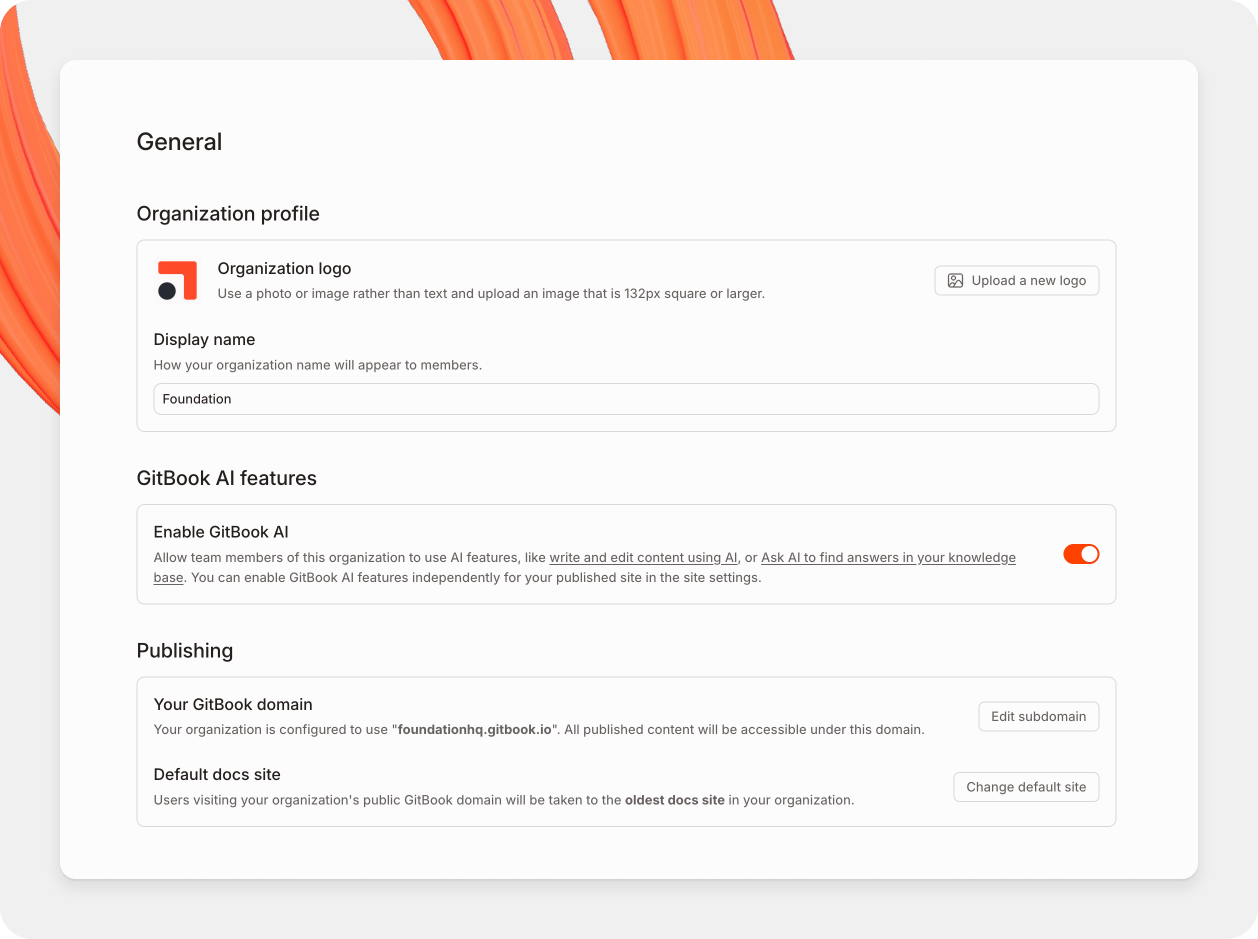
あなたの組織設定ページ。
### 組織の設定にアクセスする
1. サイドバーの上部で、組織メニューを開きます。
2. クリックして **設定**.
設定は専用画面で開きます。あなたの個人用 **アカウント** 設定には **全般**, **通知**, **組織**を読み取り、 **開発者ツール**。あなたの **組織** 設定はサイドバーに表示されます。クリック **アプリに戻る** と、作業に戻れます。
サーバー側の **組織** グループには次のページが含まれます:
全般
**組織プロフィール**
組織のロゴと名前を更新します。
**GitBook AI機能**
[GitBook AI](/docs/documentation/ja-gitbook-documentation/kontentsuwosuru/searching-your-content/gitbook-ai.md)搭載の検索では、メンバーがコンテンツについて自然言語で質問できます。また、サイトの [カスタマイズ設定で公開コンテンツに対してGitBook AIを有効にすることもできます。](/docs/documentation/ja-gitbook-documentation/manage-your-site/customization.md).
**アクション**
このセクションから組織を削除します。
{% hint style="danger" %}
**組織の削除は取り消せません。** GitBookは関連データをすべて削除します。組織所有のコンテンツを保持するには、 [別の組織に移動します](/docs/documentation/ja-gitbook-documentation/kontentsuwosuru/content-structure/space.md#move-a-space) まず。
{% endhint %}
メンバー
追加と削除 [メンバー](/docs/documentation/ja-gitbook-documentation/collaborate/member-management.md)。また、各メンバーの [role](/docs/documentation/ja-gitbook-documentation/collaborate/member-management/roles.md).
マージルール
組織全体で変更リクエストがどのようにレビューされ、マージされるかを管理します。組織ルールは既定で各セクションに適用されます。各セクションは、それらのルールを継承、置換、または無効化できます。詳細はこちら: [マージルール](/docs/documentation/ja-gitbook-documentation/collaborate/merge-rules.md).
GitBook Agent
次の組織レベル設定を管理します: [GitBook Agent](/docs/documentation/ja-gitbook-documentation/gitbook-jento/overview.md).
統合
組織にインストールされている連携を確認できます。また、 [新しい連携をインストールする](/docs/documentation/ja-gitbook-documentation/manage-your-site/install-an-integration.md).
OpenAPI
組織のサイトがAPIリファレンスに使用するOpenAPI仕様を管理します。
翻訳
自動翻訳の組織全体設定を管理します。
招待リンク
人々が組織に参加できるリンクを作成・管理します。
チーム
[チーム](/docs/documentation/ja-gitbook-documentation/collaborate/member-management/teams.md) 組織メンバーをグループ化します。チームのメンバーにアクセス権を付与できます。
SSO
**メールドメイン**
追加した各ドメインについて、そのドメインのメールアドレスを持つ人はGitBookアカウントを作成すると組織にアクセスできます。既定の [role](/docs/documentation/ja-gitbook-documentation/collaborate/member-management/roles.md).
**SAML**
Enterpriseプランをご利用の場合は、希望するIDプロバイダーでSAMLシングルサインオンを設定してください。 [営業担当に問い合わせる](mailto:sales@gitbook.com) Enterpriseにアップグレードするには。
請求
現在のプランを表示し、プランを切り替えます。トグルを使って、2か月分無料の年間価格または月額価格を表示します。その後、各プランの下にあるアップグレードまたはダウングレードのボタンを使用します。
こちらをご覧ください [請求ポリシー](/docs/documentation/ja-gitbook-documentation/akauntoto/plans/billing-policy.md) プランを途中で変更した場合の料金の計算方法を確認するには。
クリックして **請求を管理** Stripeを開きます。そこで、お支払い方法と請求情報を管理できます。また、 [プランをキャンセルする](/docs/documentation/ja-gitbook-documentation/akauntoto/plans/cancelling-a-plan.md)。請求期間が終了する前に更新すれば、プランは中断なく継続します。
### 組織の所有権を移譲する
GitBookでは管理者は同じ権限を共有しています。請求、メンバー、公開を管理できるため、所有権の移譲とは新しい所有者を管理者にすることを意味します:
1. 新しい所有者が [管理者](/docs/documentation/ja-gitbook-documentation/collaborate/member-management/roles.md) であることを確認してください。
2. 完全に引き継ぐには、もう一人の管理者にあなたを組織から削除してもらってください。組織のコンテンツへのアクセスを失います。
組織はそのままに、別のメールアドレスでサインインしたい場合は、次でメールを更新してください: **アカウント → 一般** 代わりに設定画面で。
### 削除されたコンテンツはどうなるか
組織を削除すると、それに関連付けられたすべてのコンテンツが永久に削除されます。これは、組織の唯一のメンバーであるアカウントを削除する場合も同様です。削除されたアカウントが複数メンバーの組織に属していた場合、そのメンバーの योगदानを含む組織のコンテンツはそのまま残ります。
コンテンツが削除されてから7日未満の場合は、次から復元できます: **ゴミ箱**。GitBookはこの7日間を超えてバックアップを保存しないため、7日以上前に削除されたコンテンツは復元できません。
---
# Agent Instructions
This documentation is published with GitBook. GitBook is the documentation platform designed so that both humans and AI agents can read, navigate, and reason over technical content effectively. Learn more at gitbook.com.
## Querying This Documentation
If you need additional information that is not directly available in this page, you can query the documentation by asking a question.
Perform an HTTP GET request on the following URL with the `ask` and `goal` query parameters:
```
GET https://gitbook.com/docs/documentation/ja-gitbook-documentation/akauntoto/organization-settings.md?ask=&goal=
```
`ask` is the immediate question: it should be specific, self-contained, and written in natural language.
`goal` is what the user is ultimately trying to achieve, the reason they need the answer. Sharing it helps GitBook give you a better, more relevant answer. A goal is most helpful when it describes the outcome the user wants rather than restating the question. For example, with `ask=how do I create an API token`, a goal like `automate deployments from our CI pipeline` lets GitBook tailor the answer to that use case.
The response will contain a direct answer to the question and relevant excerpts and sources from the documentation.
Use this mechanism when the answer is not explicitly present in the current page, you need clarification or additional context, or you want to retrieve related documentation sections.