> For the complete documentation index, see [llms.txt](https://gitbook.com/docs/llms.txt). Markdown versions of documentation pages are available by appending `.md` to page URLs; this page is available as [Markdown](https://gitbook.com/docs/documentation/ja-gitbook-documentation/akauntoto/account-settings.md).
# 個人設定
個人用GitBookアカウントの設定を表示・管理する
ログイン情報、サードパーティのログインオプション、GitBookサブドメイン、インターフェーステーマ、通知、連携、APIアクセストークンを管理できます。
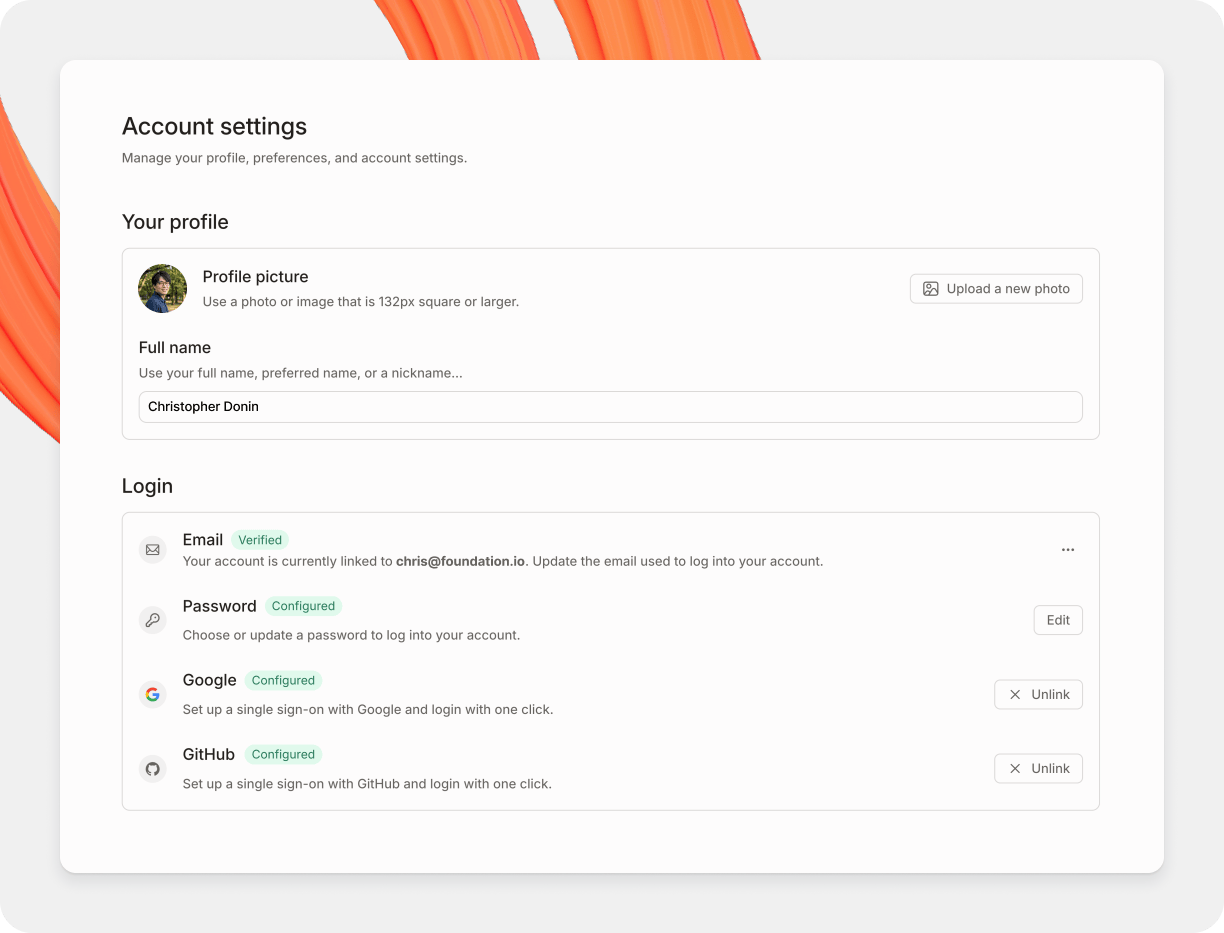
あなたの個人設定ページ。
### 個人アカウント設定にアクセスする方法
組織に戻る **ホーム** を開いて **設定**で **管理者** サイドバー内で。アカウント設定と組織設定は1つの画面を共有し、次のようにグループ化されています。 **アカウント** と **組織** 左側のサイドバー内で。個人設定は次の下にあります。 **アカウント**。クリックして **アプリに戻る** コンテンツに戻るには。
全般
**プロフィール**
プロフィール画像と氏名を更新できます。
**ログイン情報**
GitBookアカウントへのログインに使用するメールアドレスとパスワードを更新できます。 **注:** 2021年10月9日以降にアカウントを作成した場合、アカウントにパスワードはなく、代わりにマジックリンクを使ってサインインします。
**サードパーティのログイン**
Googleおよび/またはGitHubの認証情報を使ってGitBookにログインすることもできます。
**公開**
個人ライブラリ内にある公開済みの各GitBookセクションには、2つの部分からなるドメインがあります:
1. `[something].gitbook.io` (これはGitBookのサブドメインです)
2. `/[spaceURL]` (これはセクション自体の設定内で設定されます)
ここでGitBookサブドメインを更新でき、デフォルトコンテンツも設定できます。これは、訪問者がGitBookサブドメインに直接アクセスしたときに表示されるセクションです。
**設定**
お好みのインターフェーステーマ—ダーク、ライト、またはシステムの設定に合わせる—を選べます。 **注:** この設定はGitBookアプリにログインしているときの体験にのみ影響し、公開済みコンテンツには一切影響しません。
**トラブルシューティング**
必要に応じて、高度なログの記録を有効にできます。これらの高度なログは、問題をより効果的にトラブルシュートするのに役立ちます。
**アカウント操作**
このセクションからサインアウトしたり、アカウントを削除したりできます。 **注:アカウントを削除すると元には戻せません!** 関連するデータもすべて削除されます。
通知
GitBookでは2種類の [通知](/docs/documentation/ja-gitbook-documentation/collaborate/notifications.md) — メール通知とアプリ内通知です。この設定画面から、さまざまなイベントが発生したときにどの種類の通知を受け取るかを決められます。
組織
あなたの個人アカウントは任意の数の組織に所属でき、このタブは次へのショートカットと考えられます。 [組織設定ページ](/docs/documentation/ja-gitbook-documentation/akauntoto/organization-settings.md) 各組織ごとに。ここから新しい組織を作成することもできます。
開発者ツール
このページでは次のためのアクセストークンを管理・作成できます。 [GitBook API](https://developer.gitbook.com/).
### **パスワードをリセットするにはどうすればよいですか?**
ご注意ください。2021年10月10日以降に作成されたアカウントにはパスワードがありません。マジックリンクを要求することでログインできます:
1. アクセス
2. 登録した個人アカウントに関連付けられているメールアドレスを入力してください
3. クリック **続行**
4. クリック **リンクを送信** (迷惑メールフォルダも必ず確認してください)
もしあなたが *する* パスワードをリセットしたい場合:
1. アクセス
2. 次の **パスワードをお忘れですか?** ページ下部のリンク
3. 登録した個人アカウントに関連付けられているメールアドレスを入力してください
4. クリック **リンクを送信** (迷惑メールフォルダも必ず確認してください)
### サインインのトラブルシューティング
#### アカウント保護とサインインの回復
**管理者によってアカウントが無効化されました** — GitBookは、スパムや詐欺アカウントを防ぐため、不審な行動を示すアカウントを自動的にブロックします。アカウントが不当にブロックされたと思われる場合はサポートに連絡してください。ブロック解除の依頼は個別に審査されます。
GitBookはスパムや不正な公開に対する保護機能を使用しています。ここでの例は代表的なものであり、すべてではありません。検出ルールやしきい値は公開していません。
以下のパターンでは自動ブロックの対象になることがあります:
* アカウントを共有しないでください。共同作業者はそれぞれ個別のメンバーとして招待し、適切な役割を割り当ててください。
* 複数のドキュメントサイトや組織を短時間で連続して作成しないでください。
* 不審に見える可能性のある自動化は避けてください。
* アカウントまたは組織での操作中にVPNサーバーを頻繁に切り替えないでください。
**登録時のメールアドレス**
3つを超えるドットを含むメールアドレスは、スパム防止のためブロックされます。この理由で登録が拒否された場合は、別の有効なメールアドレスを使用してください。
アカウント作成後は、次の場所にある対応済みのメールとリンクのオプションを使用してください。 **ログイン情報**。この制限を回避するためにアカウントを作成または共有しないでください。GitBookはすべての代替メールアドレスをリンクできるわけではありません。
**ブロックまたは登録拒否からの回復**
上記の案内でアカウントのブロックや登録拒否が解決しない場合は、次の手順を行ってください:
1. お問い合わせ [サポートに問い合わせる](/docs/documentation/ja-gitbook-documentation/herupu/contact-support.md).
2. アカウントのメールアドレスと、操作内容またはエラーの簡潔な説明を記載してください。
3. サポートに利用資格の確認を依頼してください。サポートは個別のケースごとにアカウントのブロックを解除する場合があります。
**組織に参加するリンクが機能しません** — `auth/invalid-email` このエラーは、組織に招待されたメールアドレスが、サインインしているGitBookアカウントのメールアドレスと一致しないことを意味します。招待した人に、どのアドレスを使ったのか確認するか、別のアドレスで招待してもらってください。
**エラー: auth/expired-action-code** — サインインまたは招待リンクの有効期限が切れています。新しいリンクを生成するか、送信者に新しいものを依頼してください。
**エラー: auth/email-already-in-use** — サインインに使用しているGitHubアカウントは、すでに別のGitBookアカウントにリンクされています。次を参照してください。 [重複の可能性があるアカウント](/docs/documentation/ja-gitbook-documentation/docs-as-code/git-sync/troubleshooting.md#potential-duplicated-accounts-when-signing-in) 識別してリンク解除する手順。
---
# Agent Instructions
This documentation is published with GitBook. GitBook is the documentation platform designed so that both humans and AI agents can read, navigate, and reason over technical content effectively. Learn more at gitbook.com.
## Querying This Documentation
If you need additional information that is not directly available in this page, you can query the documentation by asking a question.
Perform an HTTP GET request on the following URL with the `ask` and `goal` query parameters:
```
GET https://gitbook.com/docs/documentation/ja-gitbook-documentation/akauntoto/account-settings.md?ask=&goal=
```
`ask` is the immediate question: it should be specific, self-contained, and written in natural language.
`goal` is what the user is ultimately trying to achieve, the reason they need the answer. Sharing it helps GitBook give you a better, more relevant answer. A goal is most helpful when it describes the outcome the user wants rather than restating the question. For example, with `ask=how do I create an API token`, a goal like `automate deployments from our CI pipeline` lets GitBook tailor the answer to that use case.
The response will contain a direct answer to the question and relevant excerpts and sources from the documentation.
Use this mechanism when the answer is not explicitly present in the current page, you need clarification or additional context, or you want to retrieve related documentation sections.