> For the complete documentation index, see [llms.txt](https://gitbook.com/docs/llms.txt). Markdown versions of documentation pages are available by appending `.md` to page URLs; this page is available as [Markdown](https://gitbook.com/docs/analytics/insights/traffic.md).
# Traffic
See how many people read your site, which pages they land on, what they search for, and what they think of your content
The **Traffic** report covers the people reading your documentation. Machines reading alongside them, such as LLMs, agents, and crawlers, are counted separately in [Agents & MCP](/docs/analytics/insights/agents-and-mcp.md), so the figures here reflect human readers.
To open it, go to **Analyze → Traffic** in your site’s sidebar.
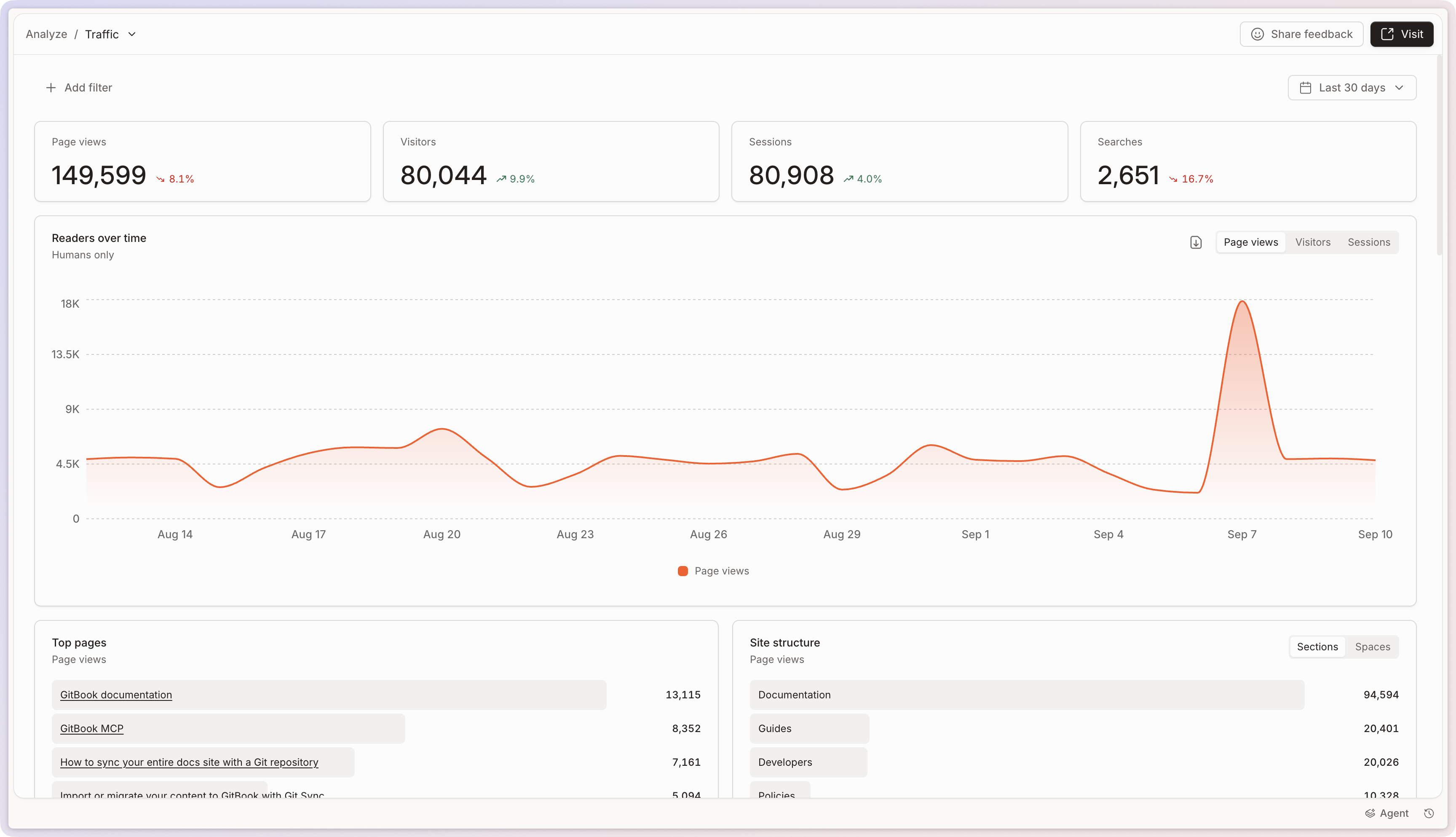
At the top, you’ll find page views, visitors, sessions, and searches for the period you selected, each compared to the period before, followed by a chart of readers over time. See [Site analytics](/docs/analytics/insights.md) for filters, time periods, and comparing periods.
The Traffic report.
## Pages and feedback
**Top pages** ranks the pages your readers open, so you can see what your site is used for.
Next to it, **Page feedback** shows how readers rate your content once you’ve enabled [page rating](/docs/manage-your-site/site-settings.md#page-ratings-pro-and-enterprise-plans) in the **Customize** menu, along with the comments they left. Low-rated pages, read together with their comments, are usually the fastest place to start improving your docs.
{% hint style="info" %}
**Why can’t I see any feedback data for my site?**\
We only display data for published sites with page ratings enabled. If your site is not published or does not have page ratings enabled, you won’t see any feedback data.
{% endhint %}
### Filter and group feedback data
Use filters to focus on a subset of ratings and comments, and groups to compare that data across a dimension. You can filter or group feedback by these dimensions:
* Content: section, variant, and page.
* Visitor dimensions: country, language, device, browser, referrer, and authenticated visitor status.
* Visitor claims configured for adaptive content, such as a customer, plan, role, or feature access.
Content filters identify where feedback comes from. Visitor dimensions add the same audience context available elsewhere in site analytics. For example, filter a page’s ratings by country, or group its feedback by device or authenticated visitor status.
The **Authenticated visitor** filter shows whether GitBook identified the visitor when they left feedback:
* **Authenticated**: The visitor signed in or arrived with signed visitor claims.
* **Anonymous**: The visitor arrived without signed identification. Claims passed through URL parameters or a public visitor cookie are unsigned.
* **Unknown**: GitBook recorded the event before tracking visitor authentication began in August 2026.
{% hint style="info" %}
To isolate feedback from a customer or segment, filter by a claim that you pass through adaptive content. For example, filter by a customer, plan, role, or feature-access claim. This shows feedback only from visitors whose events include that claim value.
Claim filters only use claims configured for your site. They do not infer customer identity from page content, sections, or variants. See [enabling adaptive content](/docs/publish/adaptive-content/enabling-adaptive-content.md) to configure visitor claims.
{% endhint %}
Feedback filters help you turn ratings and comments into focused updates. For example, you can:
* Identify pages or sections with lower ratings, then review their comments.
* Compare feedback from authenticated and anonymous visitors to find audience-specific gaps.
* Check ratings for pages that vary by customer claim, then improve the content for that segment.
To use or analyze this data outside of GitBook, open the card’s menu and click **Download CSV**. The export has one row per rating, with the comment, a link to the page, and the time the rating was left.
## Search
The **Search** card shows what readers typed into your site’s search. Use it to find out what people expect to exist, and which searches your content doesn’t answer yet. That is a good signal for what to write next, or for content that exists but is hard to find.
## Where your readers come from
The rest of the report breaks your audience down:
* **Platform**, **Countries**, and **Languages**: who your readers are and what they read on.
* **Traffic sources**: the domains and URLs sending you visitors.
* **Campaigns**: traffic broken down by `utm_source`, `utm_medium`, `utm_campaign`, `utm_term`, or `utm_content`.
* **Active hours**: when your site is busiest, as a heatmap across the week.
* **Bots**: page views from crawlers, kept out of the reader figures in this report.
Sites using [adaptive content](/docs/publish/adaptive-content/enabling-adaptive-content.md) also get a **Visitor attributes** card, showing traffic by the claims you pass, for example a customer, plan, or role.
---
# Agent Instructions
This documentation is published with GitBook. GitBook is the documentation platform designed so that both humans and AI agents can read, navigate, and reason over technical content effectively. Learn more at gitbook.com.
## Querying This Documentation
If you need additional information that is not directly available in this page, you can query the documentation by asking a question.
Perform an HTTP GET request on the following URL with the `ask` and `goal` query parameters:
```
GET https://gitbook.com/docs/analytics/insights/traffic.md?ask=&goal=
```
`ask` is the immediate question: it should be specific, self-contained, and written in natural language.
`goal` is what the user is ultimately trying to achieve, the reason they need the answer. Sharing it helps GitBook give you a better, more relevant answer. A goal is most helpful when it describes the outcome the user wants rather than restating the question. For example, with `ask=how do I create an API token`, a goal like `automate deployments from our CI pipeline` lets GitBook tailor the answer to that use case.
The response will contain a direct answer to the question and relevant excerpts and sources from the documentation.
Use this mechanism when the answer is not explicitly present in the current page, you need clarification or additional context, or you want to retrieve related documentation sections.